

Submitting your XML sitemap to Google is one of the most important steps in ensuring your website gets properly crawled and indexed by search engines. An XML sitemap acts like a roadmap, guiding Google to discover and understand the structure of your site. Without submitting it, you might have valuable pages that remain unnoticed in search results.
In this guide, we’ll walk you through how to submit XML sitemaps to Google using Google Search Console, why it matters for SEO, common mistakes to avoid, and best practices to keep your sitemap optimized.
Table of Contents
What Is an XML Sitemap?
Submitting your XML sitemap to Google is one of the most important steps in ensuring your website gets properly crawled and indexed by search engines. An XML sitemap acts like a roadmap, guiding Google to discover and understand the structure of your site. Without submitting it, you might have valuable pages that remain unnoticed in search results.
In this guide, we’ll walk you through how to submit XML sitemaps to Google using Google Search Console, why it matters for SEO, common mistakes to avoid, and best practices to keep your sitemap optimized.
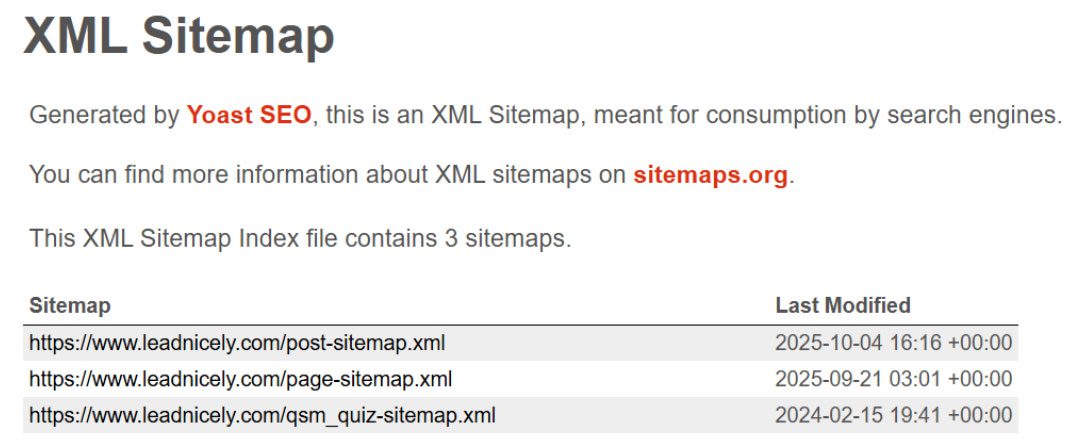
An XML sitemap, written in Extensible Markup Language (XML) format, is a file that provides search engines like Google with a structured table of contents of a website, listing all important URLs to help them better discover, crawl, and index the site’s content.
You can think of it as a roadmap for Google’s search bots. While search engines can discover pages on their own, a sitemap makes the process easier, faster, and more accurate.
An XML sitemap typically includes:
- URLs: The important pages of your website.
- Last modified date: When each page was last updated.
- Update frequency: How often the content is likely to change.
- Priority: The relative importance of a page compared to others.
For example, a sitemap entry might look like this:
<url>
<loc>https://yourwebsite.com/about</loc>
<lastmod>2025-09-30</lastmod>
<priority>0.8</priority>
</url>
This structure tells Google which pages matter most and when they were last updated.
Why Submitting a Sitemap to Google Matters
Even though Google can find pages without a sitemap, there are several reasons why submitting one is essential:
- Faster indexing: New pages are discovered and indexed more quickly.
- Comprehensive crawling: Complex websites with multiple layers of navigation are easier for Google to understand.
- Error reporting: Google Search Console provides feedback on indexing errors, broken links, or blocked pages.
- Control: You can highlight the content that matters most instead of leaving it up to search bots.
- Improved SEO: By guiding Google to your important content, you increase your chances of ranking higher.
In short, knowing how to submit an XML sitemap to Google gives you direct influence over how search engines view your site.
Steps to Submit XML Sitemap to Google
Submitting your sitemap is a straightforward process. Here’s a detailed breakdown:
Step 1: Create an XML Sitemap
Before submission, ensure your website has a sitemap. Many content management systems (CMS) like WordPress, Shopify, and Wix automatically generate one. You can usually find it at:
https://yourwebsite.com/sitemap.xml
If your site doesn’t generate one automatically, you can use plugins like Yoast SEO, Rank Math SEO, or free online tools such as XML-sitemaps.com.

For more information, check out our article on How to Create an XML Sitemap.
Step 2: Verify Website Ownership in Google Search Console
Google requires you to verify ownership of your site before you submit a sitemap.
- Go to Google Search Console.
- Click “Add Property” and choose your domain.
- Verify using one of the following methods:
- DNS record: Add a TXT record to your domain settings.
- HTML file upload: Upload the provided file to your site’s root directory.
- Google Analytics: Verify through an existing analytics account.
Verification ensures that only site owners can submit sitemaps.
Step 3: Navigate to the Sitemaps Section
Once your website is verified, log in to Search Console. In the left-hand menu, find the “Indexing” section and click “Sitemaps.”
Step 4: Submit Your Sitemap URL
In the “Add a new sitemap” field, enter the full URL of your sitemap (for example, https://yourwebsite.com/sitemap.xml). Click “Submit.”
Google will process the sitemap, check its format, crawl the listed pages, and decide which ones to index in search results.
Step 5: Monitor Sitemap Status
After submission, Google provides a status update. You can see:
- Whether the sitemap was read successfully
- How many URLs were discovered
- Any errors or warnings
- The date Google last crawled it
Monitoring this section regularly helps ensure your content is being indexed correctly.
Best Practices for Submitting and Maintaining Sitemaps

Submitting your sitemap is just the beginning. To keep it effective, follow these best practices:
- Keep it updated: Ensure your sitemap automatically updates when you add or remove pages.
- Submit only canonical URLs: Avoid duplicate or redirected links.
- Use HTTPS: Make sure your sitemap includes only secure URLs.
- Limit the size: For very large sites, split sitemaps into smaller files, each with a maximum of 50,000 URLs or 50MB. Most small-to-medium websites won’t need this.
- Resubmit if necessary: If you make major site changes, resubmit your sitemap in Google Search Console.
Common Issues When Submitting Sitemaps
Even though the process is simple, some errors can occur. Here are common problems and how to fix them:
- Incorrect sitemap URL: Make sure the URL is correct and accessible.
- Blocked by robots.txt: Check that your robots.txt file isn’t blocking important pages.
- Submitted URL marked as “noindex”: Make sure your pages don’t have a “noindex” tag if you want them to appear in search results.
- Non-canonical URLs: Include only canonical versions of your pages to avoid duplication issues.
- Server errors: Make sure your hosting environment is stable so Google can fetch the file.
Addressing these problems quickly helps ensure your sitemap works effectively.
FAQs
An XML sitemap is a file that lists important URLs on a website, helping search engines like Google crawl and index content more efficiently.
Submission doesn’t guarantee instant indexing. Google decides the crawl rate based on your website’s authority, structure, and update frequency. For new websites, it may take several days or weeks. Established sites with regular updates usually see quicker indexing.
Yes, while Google can sometimes find your sitemap automatically, submitting it through Google Search Console ensures faster and more accurate indexing.
If your sitemap updates automatically, you don’t need to resubmit it. However, if you make major site changes, you should resubmit it in the Search Console.
Yes, large websites can have multiple sitemaps, often grouped under a sitemap index file. Each sitemap can contain up to 50,000 URLs.
Conclusion
Learning how to submit an XML sitemap to Google is one of the most valuable SEO steps you can take. It ensures Google understands your website’s structure, prioritizes important content, and indexes new updates quickly.
By verifying your site in Google Search Console, adding your sitemap, and monitoring its performance, you can gain greater control over how your website appears in search results.
Submitting your XML sitemap takes just a few minutes, but the SEO benefits can last for years. Whether you run a blog, business site, or large online store, this step is crucial for building long-term online visibility.
If you need help with anything related to SEO, get in touch with Lead Nicely. Our team is ready to help your website reach its full potential. We use cost-effective strategies to drive targeted traffic and deliver long-term results.

Author Bio
Avani Jain is a Digital Marketing and SEO Strategist with Lead Nicely. She specializes in human-first content strategies that blend authenticity, empathy, and performance. Passionate about healthcare communication, Avani helps build trust through storytelling that educates, empowers, and connects.


